EXCELLENT COMPUTER EDUCATION | INDIRA NAGAR, LUCKNOW
Learn Advanced Excel, MIS Reporting, Data Analysis, Professional Dashboards and Microsoft Power BI with practical projects.

Introduction: Why Learn Advanced Excel with Power BI?
In today's competitive job market, companies need professionals who can manage business data, prepare MIS reports, analyze information and create meaningful dashboards. Microsoft Excel and Power BI are two powerful tools widely used for these tasks.
The Advanced Excel with Power BI – Complete MIS Training program is designed for students, graduates, job seekers and working professionals who want to develop practical office and data analysis skills.
At Excellent Computer Education, Indira Nagar, Lucknow, learners can develop practical skills through Excel assignments, real-world MIS reporting exercises and Power BI dashboard projects.
- Advanced Excel Formulas and Functions
- Professional MIS Reporting
- Excel Dashboard Development
- Data Cleaning and Analysis
- Power Query and Data Transformation
- Power BI Reports and Interactive Dashboards
- Practical Office-Based Projects
What Is MIS Reporting?
MIS stands for Management Information System. MIS reporting is the process of collecting, organizing, analyzing and presenting business information to help managers make better decisions.
MIS Executives commonly prepare daily, weekly and monthly reports using Excel and business intelligence tools.
Examples of MIS Reports
- Daily Sales Report
- Monthly Sales Performance Report
- Employee Attendance Report
- Salary and Payroll Report
- Stock and Inventory Report
- Customer Database Report
- Purchase and Expense Report
- Target vs Achievement Report
Complete Advanced Excel Training Syllabus
Advanced Excel training focuses on practical spreadsheet skills used in offices, accounting departments, MIS departments and business operations.
1. Excel Fundamentals
- Workbook and Worksheet Management
- Data Entry and Formatting
- Sort and Filter
- Excel Tables
- Data Validation
2. Advanced Excel Formulas
- VLOOKUP and HLOOKUP
- XLOOKUP
- INDEX and MATCH
- IF and Nested IF
- IFS and IFERROR
- SUMIFS and COUNTIFS
- LEFT, RIGHT and MID
- TEXT and DATE Functions
3. Data Analysis
- Pivot Tables
- Pivot Charts
- Conditional Formatting
- Advanced Filters
- Remove Duplicates
- What-If Analysis
4. Excel Dashboards
- Interactive Dashboards
- KPI Cards
- Slicers and Timelines
- Charts and Graphs
- Dynamic Reports
- Management Reporting
Microsoft Power BI Training Syllabus
Microsoft Power BI is a business intelligence platform used to transform raw data into interactive reports and visual dashboards.
Power BI helps organizations understand business performance, identify trends and make data-driven decisions.
Power BI Modules
- Introduction to Microsoft Power BI
- Power BI Desktop Installation and Interface
- Importing Data from Excel and CSV Files
- Power Query Editor
- Data Cleaning and Transformation
- Data Modeling and Relationships
- Introduction to DAX Formulas
- Calculated Columns and Measures
- Charts, Tables and Visualizations
- Interactive Reports and Dashboards
- Filters, Slicers and Drill-Through
- Publishing and Sharing Reports
Advanced Excel vs Power BI
| Features | Advanced Excel | Power BI |
|---|---|---|
| Data Entry | Excellent | Limited |
| Data Analysis | Yes | Yes |
| Complex Formulas | Excel Functions | DAX |
| Interactive Dashboards | Yes | Advanced |
| Data Visualization | Charts and Pivot Charts | Interactive Visuals |
| Large Data Analysis | Depends on workbook and system limits | Designed for scalable analytical models |
| Business Reporting | Yes | Yes |
Practical MIS Projects for Students
Practical projects are an important part of professional computer training. Students should learn how to prepare reports using real-world business scenarios.
Project 1: Sales Dashboard
Create a monthly sales report showing total sales, products, regions and sales performance using Pivot Tables, charts and slicers.
Project 2: Employee Management
Prepare an employee database with employee ID, department, joining date, salary and attendance details.
Project 3: Salary Report
Automate salary calculations using basic salary, allowances, deductions and net salary formulas.
Project 4: Inventory Management
Create a stock management report showing opening stock, purchase, sales, closing stock and reorder levels.
Project 5: Student Fee Dashboard
Prepare student fee collection, pending fees and monthly collection reports.
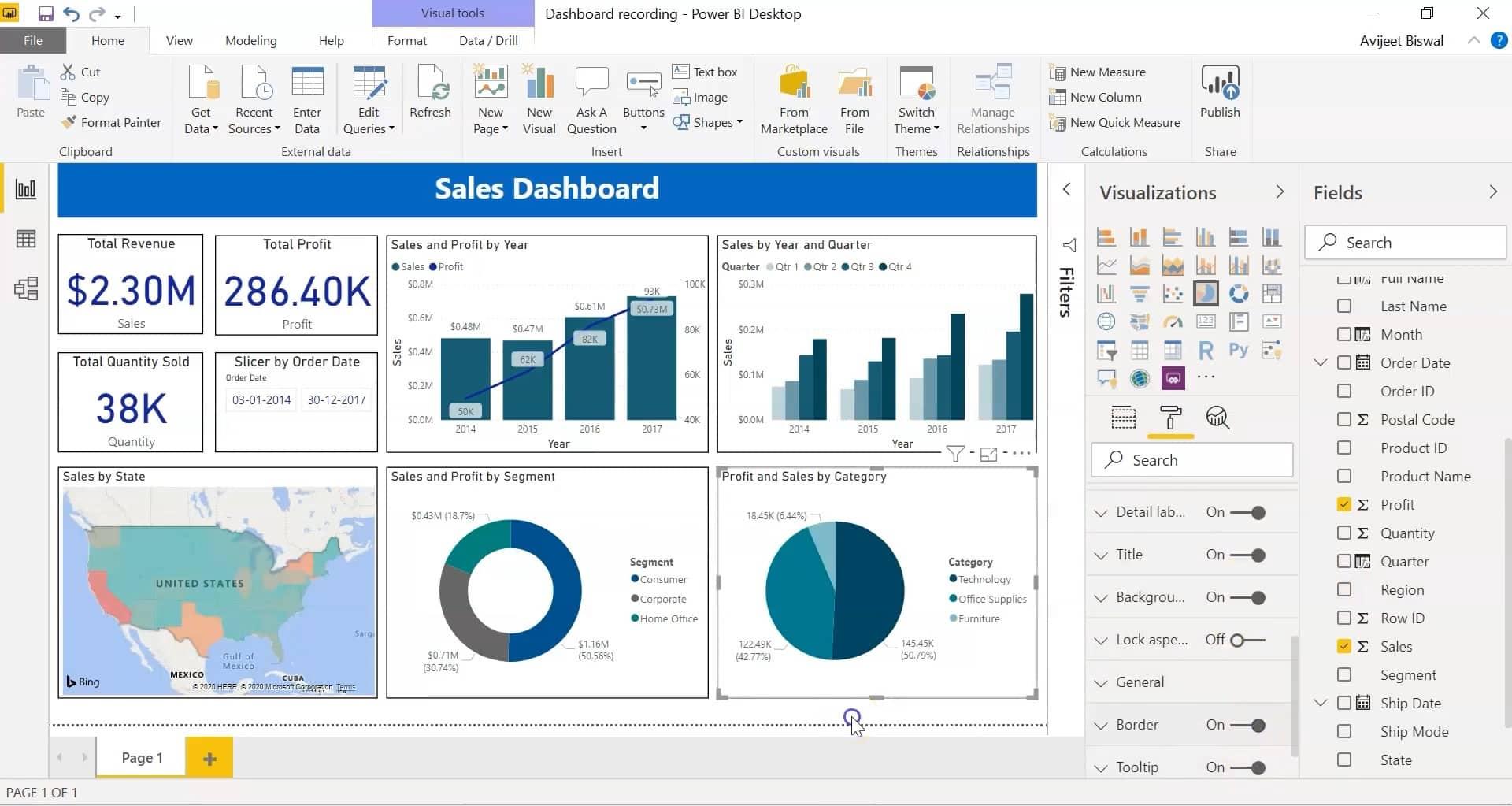
Project 6: Power BI Business Dashboard
Import Excel sales data into Power BI and create an interactive dashboard with KPIs, charts, filters and business insights.
Who Should Learn Advanced Excel with Power BI?
- 12th Pass Students
- College Students and Graduates
- Job Seekers and Freshers
- Accountants and Office Assistants
- MIS Executives
- Data Entry Operators
- Sales and Marketing Professionals
- Working Professionals
- Business Owners and Entrepreneurs
Career Opportunities After MIS Training
After developing practical Excel, MIS and Power BI skills, learners can explore entry-level opportunities in reporting, administration, operations and data analysis.
| Job Profile | Typical Work |
|---|---|
| MIS Executive | Preparing daily and monthly reports |
| Data Analyst - Entry Level | Analyzing and presenting business data |
| Reporting Executive | Preparing management reports |
| Excel Executive | Managing spreadsheets and reports |
| Power BI Developer - Junior | Creating reports and dashboards |
| Operations Executive | Managing operational data and reporting |
Note: Job opportunities depend on practical skills, education, experience and employer requirements. Completing a course does not guarantee employment.
Why Choose Excellent Computer Education in Lucknow?
Excellent Computer Education is a computer training institute located in Indira Nagar, Lucknow, focused on practical and job-oriented computer education.
Practical Learning
Learn through hands-on exercises and office-based assignments.
Experienced Faculty
Learn important computer and reporting concepts with faculty guidance.
Modern Computer Lab
Practice using computer systems and relevant software tools.
Project-Based Training
Work on practical Excel reports and dashboard assignments.
Study Material
Learn with notes, practice assignments and assessments.
Job-Oriented Approach
Build skills relevant to office work, MIS reporting and data analysis.
Frequently Asked Questions (FAQs)
1. What is Advanced Excel with Power BI?
It is a professional skill-based training combination covering Excel formulas, data analysis, MIS reporting, dashboards and Power BI business intelligence tools.
2. Can beginners learn Advanced Excel and Power BI?
Yes. Beginners can start with Excel fundamentals and gradually progress to advanced formulas, MIS reporting and Power BI.
3. How long does it take to learn MIS Reporting?
Learning time depends on your current Excel knowledge, practice time and course coverage. A structured training plan with regular practical assignments is recommended.
4. Is Power BI useful for MIS Executives?
Yes. Power BI helps MIS professionals create interactive dashboards, analyze business data and present reports more effectively.
5. Is Advanced Excel enough to get an MIS job?
Advanced Excel is an important skill for many MIS roles. Knowledge of Power BI, reporting concepts, communication and practical business projects can further improve your job readiness.
6. Where is Excellent Computer Education located?
Excellent Computer Education is located at UG-10, Goel Palace, Faizabad Road, Indira Nagar, Lucknow, Uttar Pradesh – 226016.
7. How can I enquire about the course?
Call or WhatsApp 9795720993 to enquire about the Advanced Excel with Power BI training program.
Learn Advanced Excel with Power BI in Indira Nagar, Lucknow
If you want to develop professional computer skills, learn MIS reporting, create Excel dashboards and understand business data through Power BI, start your learning journey with practical training.
Contact Excellent Computer Education for course details, admission information and a demo class.
Admissions Open – Advanced Excel with Power BI
Excellent Computer Education
Authorised Training Center – NIELIT, AICPE
UG-10, Goel Palace, Faizabad Road, Indira Nagar, Lucknow – 226016
Mobile / WhatsApp: 9795720993
Get Course Details on WhatsApp Call Now